
Hey Tickers,
This update brings brand new HD damage numbers and a new Settings window, so every player can set the game up for their own PC.
HD damage numbers
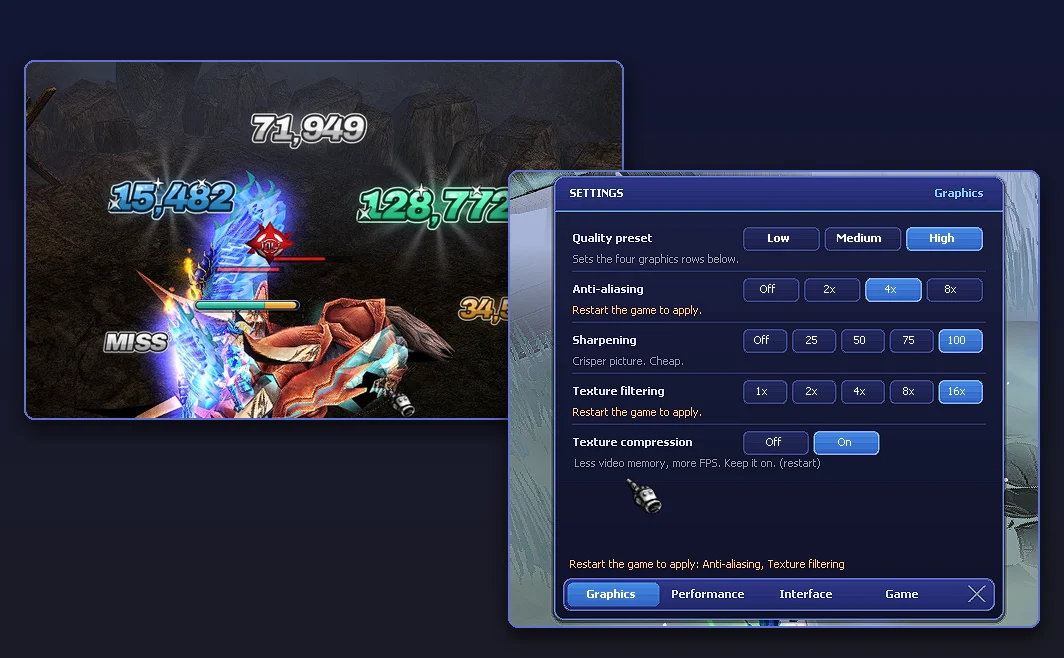
- Big, sharp damage numbers with a clean outline, a soft shine and commas, so 1,234,567 reads at a glance.
- Each hit type keeps its own colour: normal hits, critical, excellent and more. The big ones glow and sparkle, and MISS is easy to spot.
- Numbers pop in and float up at the same speed at any FPS.
- You can turn them off or change their size in the new Settings window.
New Settings window
- Opens from Esc, Option or the U menu, like before, with four tabs: Graphics, Performance, Interface and Game.
- Quality presets: Low, Medium or High in one click, or set each option yourself: anti-aliasing, sharpening, texture filtering and texture compression.
- FPS limit: Max, 30, 60, 90, 120, 144 or 240. A limit your PC can hold gives the smoothest game.
- Slower PC? Pick the Low preset and a 60 FPS limit. The game starts on Medium.
- Options that need a restart say so, and the window tells you which ones are waiting.
- The Game tab has the classic options in the new look: resolution, font size, effect switches, volume, AutoAttack, WhisperBeep and Slider.
- Your choices are saved on your PC and stay through every update.
Health bars
- The old player health bar is gone for good, so it can no longer pop back on over the TickMU bars.
Please open the TickMU Launcher to get the update.
Frost | TickMU Staff Team
 Loading...